Complete assemblies, not single parts
AssemblyMade parts and purchased parts are placed and counted, with an exploded view and a balloon for every item.
46parts in the demo
16 unique · 6.88 kg · 11 drawing sheets
Think it. Build it.
Describe the part or assembly you need. Mechpro generates 3D models, drawings, a parts list and an engineering report, with its assumptions and checks set out for your review.
No payment details are asked for. You receive digital files; Mechpro does not make parts.
Engine outputMP-EX01 · Rev A
The brief
“Right-angle bevel gearbox, assembled, ratio 2:1. Straight bevel gears, module 2.5: a 16-tooth pinion on a 15 mm input shaft …”
What came back
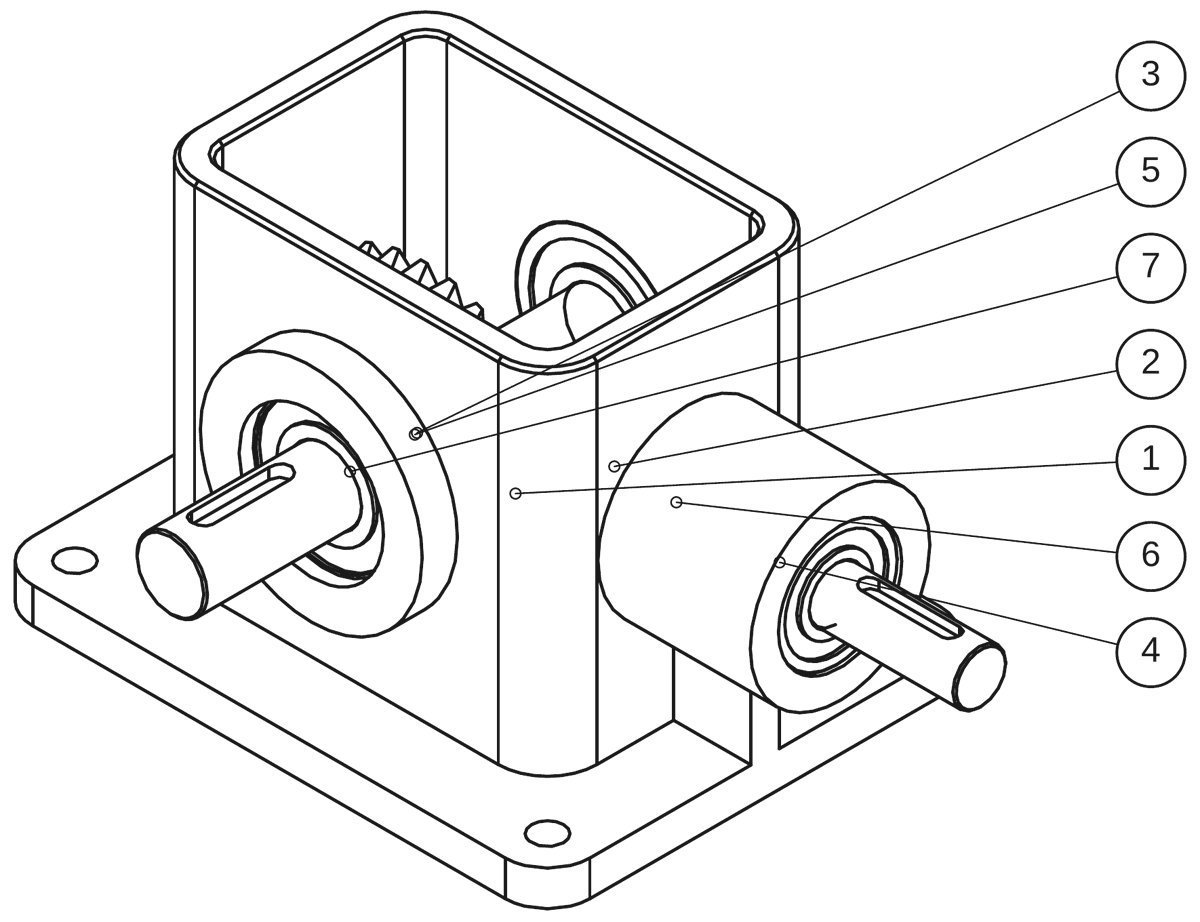
With the 3D model (STEP), the drawing (PDF), the report and the parts list.
12 of 12 requirement checks met. Not checked by an engineer.
A real result
Real Mechpro engine output, shown as it came out, with its files to download.
Where this example comes from. The brief is one of our own test requests, not a customer’s. A language model wrote the design in a single reply during a blind test, and on 25 October 2026 the current Mechpro engine built, measured and packaged it. Nothing was edited by hand. The 12 requirement checks are the test’s own, written from the brief. It did not go through the website, and no engineer has checked it.
Right-angle bevel gearbox, assembled, ratio 2:1. Straight bevel gears, module 2.5: a 16-tooth pinion on a 15 mm input shaft and a 32-tooth gear on a 20 mm output shaft, axes crossing at 90 degrees. Each shaft runs in two ball bearings, 6202 on the input shaft and 6204 on the output shaft, seated in a one-piece open-top housing with 8 mm walls and a 10 mm base that has four 9 mm mounting holes. Show the bearings as parts.
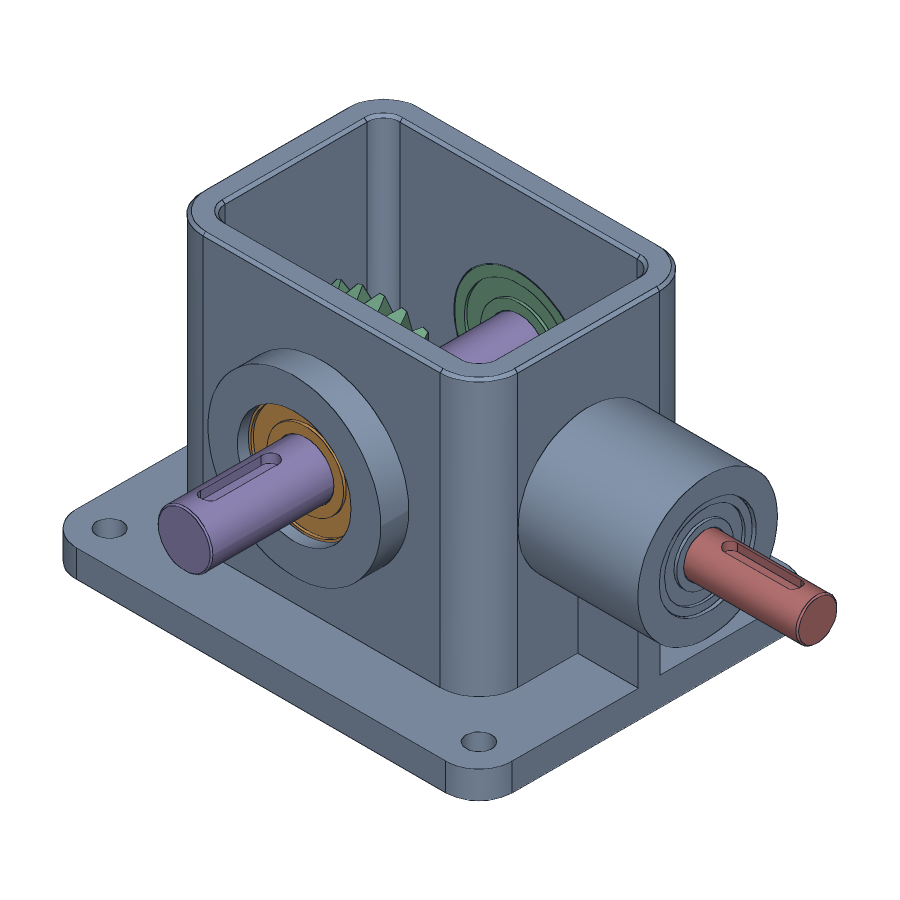
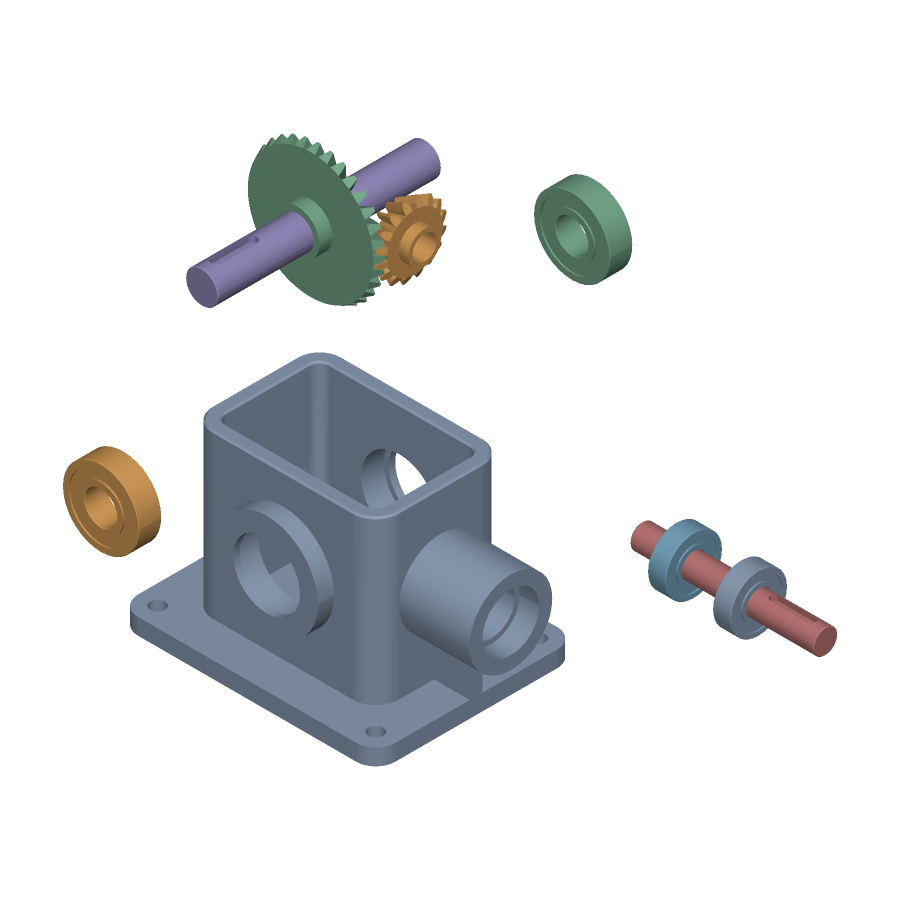
A cast housing, two shafts and two bevel gears, with the four ball bearings as purchased parts.
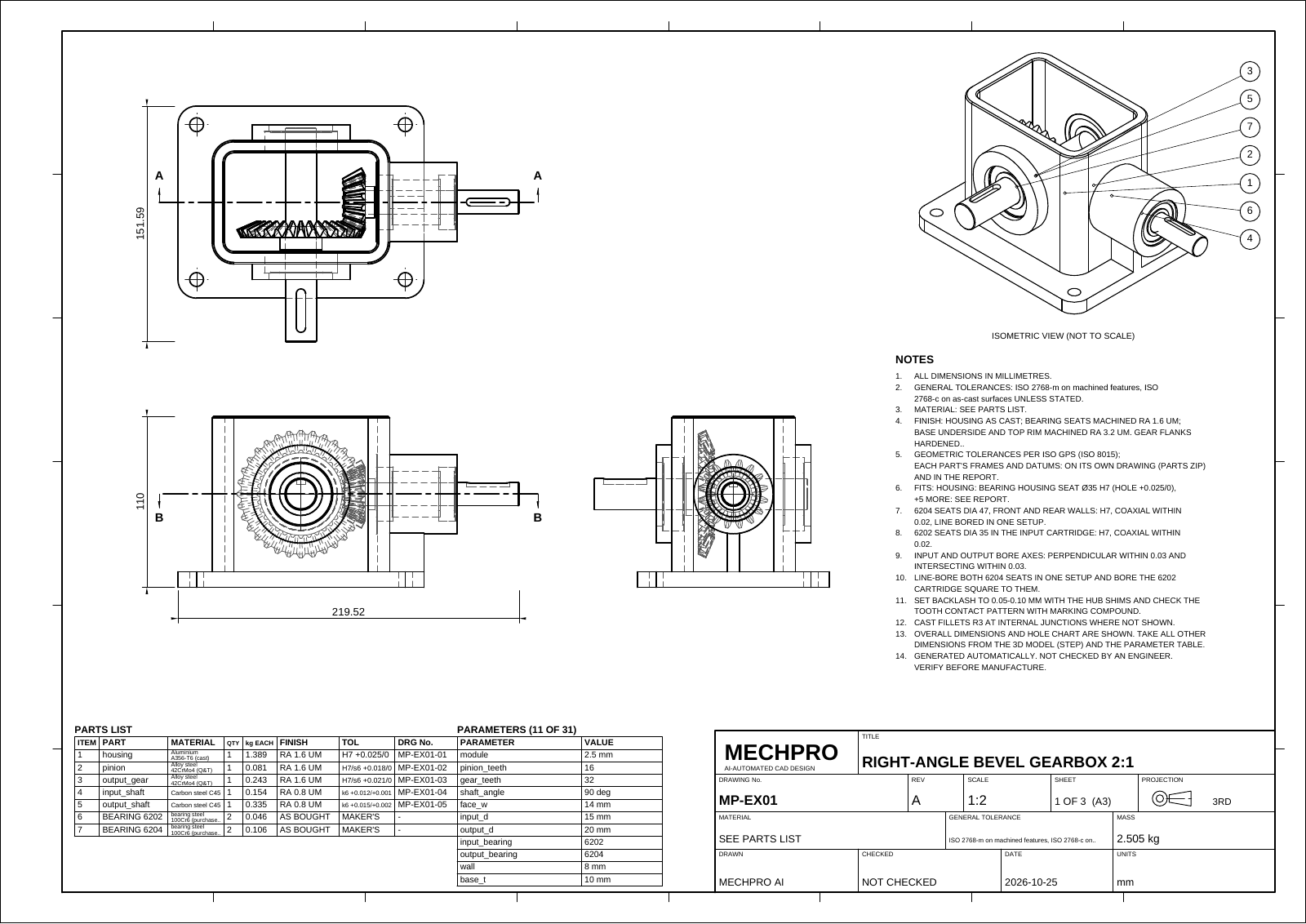
Views, overall dimensions, item balloons, notes, a parts list with finish and tolerance columns, and a title block marked “not checked”. Sheets 2 and 3 are the two sections, with enlarged details. Each made part also has a drawing of its own in the package.
This example has no revision. In your account, a change you write under a delivered request becomes revision B, with its own files.
Who it is for
Mechpro is for people who need a mechanical part or assembly designed in CAD, such as a bracket, a housing, a shaft, a gear or a gearbox. You do not have to model it yourself, but a qualified engineer must review the design before it is made.
Your written requirements become geometry you can open, measure and change, instead of an empty file.
Every package has drawing sheets with views and a parts list, and a CSV parts list for spreadsheets, so they need not be prepared separately.
Write what should change. It becomes the next revision, with its own files, and the earlier ones stay.
The report keeps the values you gave apart from the values Mechpro chose, so you can see what to confirm.
STEP for your CAD program, PDF and DXF drawings, STL for printing: you carry on in your own tools.
How it works
Everything happens in your account. We email you when there is something to see, and the email never carries your design.
Sign up with your email address and open the link we send to confirm it. Your requests are private to your account.
Describe the part or assembly, add up to six photos or sketches and the dimensions it must keep, and choose the files you need.
The engine writes a parametric model, builds it, measures it against your stated requirements and writes the drawings and report. If a value that decides the design is missing, it may ask you first.
Download the files from your account, have them reviewed, and ask for changes in plain words.
A simplified demo generator in your browser builds this gearbox from the fixed brief below. It is not the Mechpro engine and not AI: it shows the kind of package you receive. The real result is above; illustrative machine studies are in the geometry lab.
Single-stage spur gearbox, 3:1 reduction, module 2, 22-tooth pinion, Ø17 input and Ø25 output shafts, cast aluminium housing with a bolted cover.
Drag to turn · scroll to zoom · click a part
Figures of the browser demo, not of the real result.
Inside the demo package
Taken from the demo gearbox above. A real package holds the same kinds of content, worked out by the engine for your brief.
Made parts and purchased parts are placed and counted, with an exploded view and a balloon for every item.
16 unique · 6.88 kg · 11 drawing sheets
In the demo: pitch diameters, centre distance and ratio, with bearings chosen to the shaft journals.
From the solids and the material of each part.
Review wall thickness, clearances and machining allowances. Open items stay visible alongside the checks that passed.
Views chosen and scaled, hidden edges resolved, dimensions placed and the title block filled in.
| Working out revision B… |
A ribbed bearing housing, shown in front, section and isometric views with its stepped bore, cooling ribs and mounting flanges.
The demo package is made in your browser: STL and OBJ meshes, PDF, SVG and DXF drawings, the report, the parts list and the parameters. A browser cannot write STEP; the real result above has one.
In the demo
The demo shows the split a real report makes: the values given in the brief, and the decisions made where it was silent, each listed for you to confirm.
Leave out what you do not know. If a missing value decides the design, the engine may ask you up to two questions under your request before it designs anything; we email you that a question is waiting. Otherwise it chooses a value, and the report lists it as an assumption, apart from the values you gave. Only the values you gave are checked as requirements, so read the assumptions and ask for a change where one is wrong.
In the demo
Open any sheet of the demo gearbox. The assembly sheet carries balloons and a parts list; the part sheets carry views, hidden lines and dimensions.
The drawing comes as a PDF, with DXF in the standard package and SVG on request. An assembly has a sheet with its views, balloons and parts list; each part made for it has a sheet of its own, and purchased parts have none. Where parts fit together, section views with enlarged details follow. The title block says the drawing is not checked: that is for your engineer.
Laying out the sheets…
What you send, what you get
You write the brief; Mechpro sends back digital files. It does not make or ship physical parts.
Leave out what you do not know: what happens then is shown above.
Download the files one by one from your account.
SOLIDWORKS, Inventor, Fusion, CATIA, NX and Creo open the STEP file as solid bodies, and AutoCAD opens the DXF. A STEP file carries the geometry, not a feature tree: importing it does not recreate the model’s editable history. Mechpro cannot write native files such as SLDPRT or DWG; if you ask for one, you get STEP or DXF and a note saying so.
Checks and limits
Automatic checks measure the model against what you asked for. They do not replace an engineer.
Generated designs require engineering review before manufacturing, above all anything that carries loads or pressure, or is used where safety depends on it.
Geometry lab · illustrative
Procedural 3D studies drawn in your browser, to explore the kind of geometry machines are made of. They are not Mechpro engine output, were not made from a brief, and are not validated designs. Downloads are OBJ meshes for viewing, not CAD solids.
Preparing the geometry lab…
AEROSPACE / 01
From the swept front fan to the exhaust nozzle. Separate the casing and internal stages to explore a detailed turbofan concept.
11 SEPARABLE ASSEMBLIES
Illustrative mesh geometry. These studies are not AI-generated results or manufacturing-validated designs.
Original procedural studies. References inform the subject matter; no third-party CAD files are reproduced. Downloads contain visualization meshes, not editable STEP solids.
Cost and timing
No payment is taken on this website, and no card details are asked for. If a request will carry a fee, we tell you the price and ask for your agreement before we start.
We deliver as soon as we can and email you when the files are ready. Delivery times are estimates, not guarantees.
Each account, and the site as a whole, can send a limited number of requests a day. Changes and answers to the engine’s questions count as requests.
Weapons, illegal items, copies of someone else’s protected product, and export-controlled designs (ITAR, EAR, SCOMET). Terms of Service
Questions
What a design is, what it is not, and what happens to your brief.
What the part does, its dimensions and the space it must fit, the material or manufacturing method if you have a preference, and any loads, speeds, pressures or temperatures you know. Add sketches or photos if they help, and add the sizes that must be kept exactly as reference dimensions. Say which values are firm and which are preferences.
If the missing value decides the design, the engine may ask you up to two questions under your request before it designs anything; we email you that a question is waiting. Otherwise it chooses a value and the report lists it as an assumption, separate from the values you gave. Assumed values are never checked as requirements, so read them and ask for a change where they are wrong.
You do not need to model the part yourself. You do need a qualified engineer to review the design, its calculations and its tolerances before anything is made or used, and that review is your responsibility.
SOLIDWORKS, Inventor, Fusion, CATIA, NX and Creo open the STEP file as solid bodies, and AutoCAD opens the DXF drawing. A STEP file has no feature tree, so you edit the solids directly or ask Mechpro for a revision. Mechpro cannot write native files such as SLDPRT, IPT or DWG; if you ask for one, you get STEP or DXF and a note saying so.
Yes. Open a delivered request, choose “Ask for a change” and describe the change in plain words. It becomes the next revision with its own files, and the earlier revisions and your brief stay with the request.
No. The automatic checks measure the model against your stated requirements; they say nothing about strength, fatigue, operating conditions or safety. Calculations in the report are first-pass estimates, and tolerances and fits are proposals until an engineer confirms them. A qualified engineer must review every design before it is made, above all anything that carries loads or pressure, or is used in vehicles, aircraft, medical devices, lifting equipment or other safety-critical uses.
That a feature with the stated value was measured on the solid model, on the part the requirement names. It does not mean the design is fit for its purpose. Requirements the engine cannot measure are marked for a person to confirm, and a design whose checks do not all pass is held for Mechpro staff before it is released to you.
No. Mechpro delivers digital files: 3D models, drawings, a parts list and a report. You choose who makes the parts.
No payment is taken on this website. If a request will carry a fee, we tell you the price and ask for your agreement before we start. We deliver as soon as we can and email you when the files are ready; delivery times are estimates, not guarantees. Each account can send a limited number of requests a day.
It makes mechanical parts and assemblies, not sculpted or organic shapes such as figures or car bodies. It writes no native CAD files and runs no structural, thermal or flow analysis. It does not accept weapons, illegal items, copies of protected products or export-controlled designs.
Only you, in your account. Mechpro staff open a request only when they need to work on it, and every opening is shown to you with its reason. The design engine gets the brief, pictures and dimensions, never your name, email address or company. You can erase a request at any time. Privacy Policy
Think it. Build it.
Generated designs require engineering review before manufacturing.
Questions before you start? hello@mechpro.ai
We sent a link to . Open it and enter your password to finish creating your account. The link works for 24 hours.
Nothing after a few minutes? Look in your spam folder, or send it again.
Legal
Effective 19 October 2026 · Version 2026-10-19
These terms are an agreement between you and Mechpro ("Mechpro", "we", "us"). By creating an account or using Mechpro you accept them and our Privacy Policy. You must be at least 18 years old and able to enter into a contract. If you use Mechpro for a company, you confirm that you may accept these terms on its behalf.
You send a written brief, optionally with pictures and reference dimensions. We return 3D CAD models, engineering drawings and a technical report in the formats you ask for, where we can produce them. Some proprietary formats cannot be produced; when that happens we tell you and supply an open format, such as STEP, instead. We use automated design tools, which may look up reference information on the public web and run first-pass sizing calculations, and the details of how a design is produced may change over time.
Do not use Mechpro to request or produce:
Do not attack, overload, scrape or test the security of the service without our written permission, and do not upload malware. We may refuse or stop any request, and suspend accounts that break these rules.
Mechpro is not built to handle export-controlled technical data. Do not send designs, drawings, dimensions or other data that are covered by export controls, such as:
Your requests are stored and processed on commercial cloud servers in the United States and by AI providers and web search services, and may be seen by people who are not US persons. Sending controlled data to us could therefore break export law. Each time you send a request or ask for a change, you confirm that it is not export-controlled. You are responsible for classifying your own designs. If we learn that a request is export-controlled, we will stop work on it and delete it, and we may suspend the account.
Designs are produced with automated tools and checked against the requirements you state and, where our tools looked up reference information or ran sizing calculations, against those too. They are not certified and may contain errors. Any calculations in the report are first-pass sizing calculations made with automated tools from published formulas and the references listed in the report; they are not a structural analysis, a certified calculation or a substitute for one. Tolerances and fits on the drawing and in the report are proposals worked out from published standards, not a manufacturing specification until an engineer confirms them. A result marked as passing a check means that a feature with that value exists; it does not mean that the design is fit for your purpose. Before you manufacture or use any design, a qualified engineer must review and verify it, including every reference, calculation and tolerance in the report, especially for anything that carries loads or pressure, or is used in vehicles, aircraft, medical devices, lifting equipment or other safety-critical applications. You are responsible for that review and for how a design is used.
You can delete your account at any time from the account menu. We may suspend or close an account that breaks these terms, and we will tell you why unless the law prevents us. We may also change or stop parts of the service; if we stop the service entirely, we will give you reasonable notice so that you can download your files.
To the extent the law allows, Mechpro is provided "as is", without warranties of any kind, including fitness for a particular purpose, and without a promise that it will always be available or error-free.
To the extent the law allows, we are not liable for indirect or consequential losses, such as lost profits, lost data or production costs arising from a design. Our total liability for any claim is limited to the greater of the fees you paid us for the request concerned and INR 5,000. Nothing in these terms limits liability that cannot be limited by law.
You will compensate Mechpro for claims by others arising from content you sent us that you had no right to share, from export-controlled data you sent us, or from how you used a design.
We may update these terms. We will post the new version here with a new date and, for significant changes, email you before they apply. If you keep using Mechpro after that, the new terms apply.
These terms are governed by the laws of India. Disputes are subject to the exclusive jurisdiction of the courts in India.
Questions about these terms: hello@mechpro.ai.
Legal
Effective 19 October 2026 · Version 2026-10-19
Mechpro ("Mechpro", "we", "us") turns a short written brief into 3D CAD models, engineering drawings and technical reports. For the personal data described here, Mechpro is the Data Fiduciary under India's Digital Personal Data Protection Act, 2023 (the "DPDP Act"). You can reach us at hello@mechpro.ai. If you live outside India, for example in the United States, this policy also explains how we handle your data, and section 9 describes your rights.
mp_session keeps you signed in; it expires after 30 days or when you sign out. mp_device remembers a browser that has proved itself with a code from your email, so it does not need a new code each time; it lasts 180 days and is sent only to the sign-in part of the site. We do not use advertising or analytics cookies, and the website keeps nothing about you in your browser's storage.We do not ask for payment card details, government ID numbers or other sensitive information. Please do not put them in a brief.
We process your data on the basis of the consent you give when you create an account and send a request, and for the legitimate uses the DPDP Act allows, such as complying with the law.
We do not sell or rent personal data. We share it only with service providers that help us run Mechpro, and only what each one needs:
The website itself loads nothing from other companies: its fonts, scripts and 3D viewer all come from our own server.
We may also disclose data when the law requires it, for example to a court or a government authority, or if Mechpro is reorganised or sold, in which case we will tell you first.
Our servers, your files and our backups are in the United States, and our AI providers process requests there. Web searches made for your design (section 5) may be answered by servers outside the United States. If you are in India, this means your data is transferred to and stored in the United States. We transfer data only as the DPDP Act permits, and not to any country the Government of India has restricted. Cloudflare may carry your traffic through the data centre nearest to you.
No system is perfectly secure. If a breach affects your data, we will tell you, and the authorities where the law requires it, such as CERT-In and the Data Protection Board of India, or regulators in US states.
Under the DPDP Act you can:
Wherever you live, including the United States, you can use the same tools to see, download, correct or delete your data, and we answer requests sent by email within 30 days. We do not sell your personal data, and we do not share it for targeted advertising.
Mechpro is for people aged 18 and over. We do not knowingly collect data from children. If we learn that we have, we delete it.
When we change this policy we will post the new version here with a new date. If a change is significant, we will email you before it applies.
Grievance Officer, Mechpro
Email: hello@mechpro.ai
Tell us what you need. The model works out the rest.
Drag to turn · scroll to zoom · click a part
Each file is prepared when you download it.